Pixel Art Gaming Icons Pack: Nostalgia Meets Modern Design
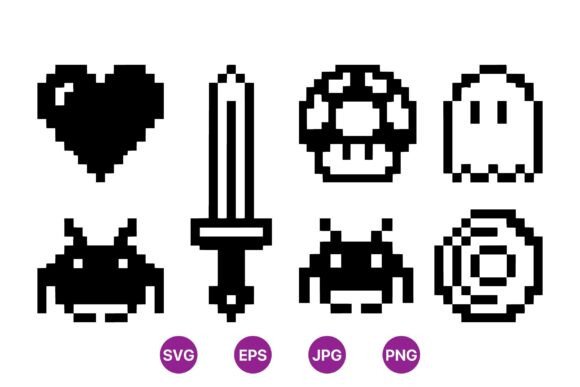
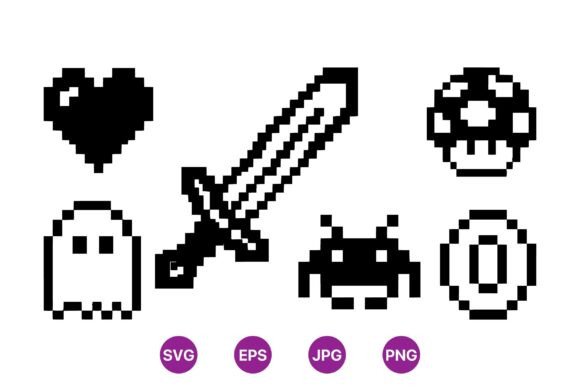
For creators, developers, and designers looking to infuse a touch of retro charm into their projects, the Pixel Art Gaming Icons Pack offers a versatile and visually striking solution. This set features classic game icons like heart, sword, ghost, alien, mushroom, and coin, all rendered in black and white. The high-contrast design ensures clarity and sharpness at any size, making it ideal for both digital and print applications.
Whether you're working on a mobile game, a website, or a marketing campaign, these icons bring a nostalgic vibe that resonates with audiences of all ages. The pack includes SVG, PNG, JPG, and EPS files, giving users flexibility across different platforms and use cases.
Why Pixel Art Gaming Icons Matter
The appeal of pixel art lies in its simplicity and timeless aesthetic. It’s not just about nostalgia—it’s about creating a visual language that’s instantly recognizable. The Pixel Art Gaming Icons Pack taps into this universal appeal, offering a collection of symbols that have defined gaming culture for decades.
These icons are perfect for indie game developers, content creators, and educators who want to add a retro flair without investing time in custom designs. They also serve as excellent assets for branding, social media, and user interface elements where clarity and style are essential.
Mistakes to Avoid When Using Pixel Art Gaming Icons
While the Pixel Art Gaming Icons Pack is a powerful tool, some users may overlook key details that affect the final outcome. One common mistake is assuming all pixel art styles are the same. The quality and consistency of the artwork can vary widely, and not all sets offer the same level of detail or scalability.
Another pitfall is not checking the file formats provided. Some packs may include only raster images (like PNG or JPG), which can lose quality when scaled up. The Pixel Art Gaming Icons Pack includes 100% vector SVG and EPS files, ensuring crisp results at any size. Failing to verify this can lead to blurry or distorted graphics in larger formats.
Understanding File Formats and Scalability
When selecting a pixel art icon set, always confirm whether the files are vector-based. Vector graphics maintain sharpness at any scale, while raster images may appear pixelated when enlarged. For example, using a raster-only set for a large banner could result in a low-quality image that doesn’t meet professional standards.
Additionally, consider the licensing terms. Some free icon sets may come with restrictions on commercial use or require attribution. The Pixel Art Gaming Icons Pack likely provides clear usage rights, but it’s important to review the license before integrating the icons into your project.
Common Misconceptions About Retro Design
Some users believe that retro design is outdated or less effective than modern aesthetics. However, this isn’t true. Retro styles can be highly effective when used intentionally. The Pixel Art Gaming Icons Pack proves that simplicity can be powerful—these icons are easy to recognize and work well in a variety of contexts.
Another misconception is that pixel art is only for games. In reality, these icons can enhance websites, apps, presentations, and even physical products. Their clean lines and bold shapes make them adaptable to many design needs.
How to Get the Most Out of Your Icon Pack
To maximize the value of the Pixel Art Gaming Icons Pack, start by understanding your project’s requirements. Ask yourself: What is the purpose of the icons? Are they for a game, a website, or a marketing campaign? Knowing this helps you choose the right icons and apply them effectively.
Also, take time to experiment with different combinations. Mix and match icons to create unique visuals that reflect your brand or message. Don’t be afraid to adjust colors or sizes to fit your design. Even though the icons are black and white, they can be easily recolored if needed.
Testing and Previewing Your Designs
Before finalizing your project, test the icons in different environments. View them on various screen sizes, backgrounds, and lighting conditions to ensure they remain visible and readable. For instance, a ghost icon might look great on a dark background but could be hard to see on a light one. Adjust accordingly to maintain clarity.
Also, check how the icons perform in motion. If they’re part of an animation or interactive element, make sure they retain their shape and definition when moving. This is especially important for game development or UI/UX design.
Final Tips for Choosing and Using Pixel Art Icons
Before downloading or purchasing any icon pack, do your research. Read reviews, check sample images, and understand the file types included. Look for packs that offer multiple formats and high-quality vectors, like the Pixel Art Gaming Icons Pack.
Consider the community and support available. Some icon sets come with tutorials, color variations, or customization options. These extras can save time and improve the overall quality of your work. Always prioritize quality over quantity—better-designed icons will have a more lasting impact than a large but inconsistent set.
Finally, remember that pixel art is more than just a style—it’s a way to connect with audiences through shared memories and visual storytelling. The Pixel Art Gaming Icons Pack gives you the tools to create meaningful and engaging designs that stand out in today’s digital world.